Showing posts with label Operators. Show all posts

12/07/2014

To know about how to extract a column from an array or matrix in MATLAB consider the following form i.e
        variable-name=matrix-name(rows,columns)
where:  

  ?  Variable-name:
                             It  shows the place where you can name your variable in which you wanna                                  store your extracted data.

  ?  Matrix-name:
                       It shows the place where you have to place your matrix name or array name from which you                          wanna extract your desired data.
  ?              ( ):
                      we use these parenthesis to send a command to MATLAB that we are gonna tell you the                             address in terms of rows and columns of an array/matrix.
  ?          Rows:
                      It shows the place where you have to put the position of your desired row (e.g 1st row or 2nd                                           row etc) of a matrix/array that you wanna extract,.we will use : in this place  which means                          each row.
  ?      Columns:
                      It shows the place where you have to put the position of your desired column(e.g 1st column or 2nd                                 column etc) of a matrix/array that you wanna extract.
Forexample:
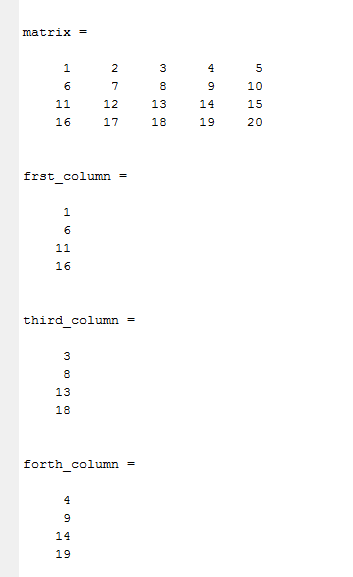
How to extract a column from a matrix/array in MATLAB.
Result of given below MATLAB code(how to extract column from matrix using MATLAB)

To know about how to extract a row from an array or matrix in MATLAB consider the following form i.e
        variable-name=matrix-name(rows,columns)
where:

?  Variable-name:
                             It  shows the place where you can name your variable in which you wanna                                  store your extracted data.

  ?   Matrix-name:
                       It shows the place where you have to place your matrix name or array name from which you                          wanna extract your desired data.
  ?               ( ):
                      we use these parenthesis to send a command to MATLAB that we are gonna tell you the                             address in terms of rows and columns of an array/matrix.
  ?          Rows:
                      It shows the place where you have to put the position of your desired row (e.g 1st row or 2nd                                           row etc) of a matrix/array that you wanna extract.
  ?     Columns:
                      It shows the place where you have to put the position of your desired column(e.g 1st column or 2nd                                 column etc) of a matrix/array  that you wanna extract.we will use : in this place  which means  each column.
e.g 
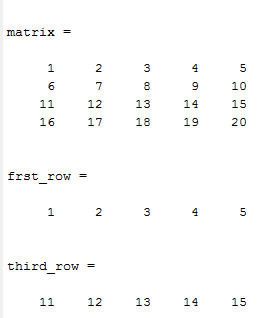
How to extract a row from a matrix or array in MATLAB.
Result of  given below MATLAB code.


  To download MATLAB code as a detailed example click below:

08/07/2014

Colon Operator è :
It is easy to create small matrixes, row vectors and column vectors but what happens when these array contain hundreds of values, it’s just practically not possible to write each value, for these MATLAB provides us with a special strong operator i.e Colon operator, represented as :
           It is used to declare a large range of values with some increment(according to demand) and correspondingly large ranged row vector, column vector and a matrix can be created using this strong operator i.e colon operator.
General form of colon operator,  INITIALVALUE:INCREMENT:FINALVALUE
By default increment is 1 if we will not mention increment to MATLAB for this we can also use the general form as INITIALVALUE:FINALVALUE, but we can set increment according to our demand for this we have to use the general form of colon operator as discussed above.
 ÄFor example we set:
      Initial value=1|  Increment=1 |  Final value=10
      So from initial to final value step by step increment will be like this described below.
                 Use of Colon Operator in MATLAB as a shortcut key.

                   
 ÄMATLAB declaration and result of colon operator :
%declaration of row vector using colon operator.
x=1:15 % here by default increment will be 1,we can also declare it as x=[1:15].
b=1:0.5:15 % here have limited MATLAB to take an increment of 0.5 each time, till final value.

%declaration of column vector using colon operator.
c=[1:15]' % by default increment is 1.
d=[1:0.5:15]'% MATLAB become limited to take an increment of 0.5 each time

%matrix declaration using colon operator.
g=[d d] % it will generate 30*2 matrix.

? To download above script click below:

script m-file for matrix,row vector and column vector declaration using colon operator

Blog Archive

Popular Posts